


America's Premium Plus Golf Simulator Impact Screen
America's Golf Simulator Screen with border and evenly spaced grommets
Close-up of America's  Golf Simulator Impact Screen with border and grommets
Top Pocket Upgrade for golf simulator screen
Bottom Pocket Upgrade for golf impact screen
Rear Tensioning Sleeve Upgrade for America's Golf Simulator Impact Screens
Add a flap to your golf simulator screen to bridge the gap between your screen and enclosure
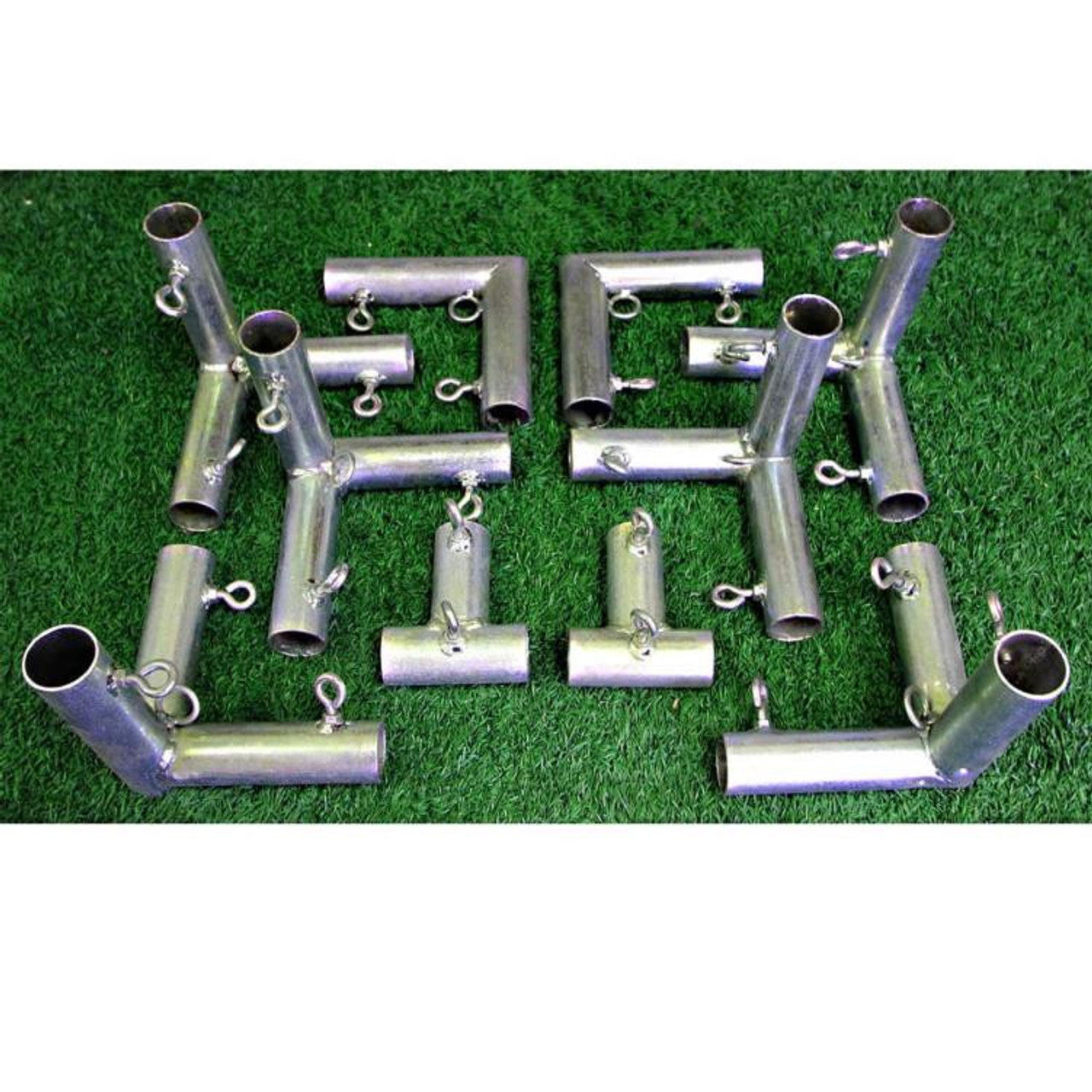
America's Rigid Unistrut Golf Simulator Screen frame brackets sold in a pair

America’s Premium Plus Golf Simulator Impact Screen

Regular price$350.00
/

  • FAST FREE SHIPPING - ORDER TODAY!
  • 100% No-Risk Money Back Guarantee
  • All Major Credit Cards Accepted
  • MADE IN THE USA BY AMERICAN WORKERS
  • In stock, ready to ship
  • Backordered, shipping soon

Your Golf Simulator Screen In 3 Easy Steps
  1. Choose Your Height — Select from six available screen heights.
  2. Choose Your Width — Select from ten available screen widths.
  3. Choose Your Screen Customizations
    Add the finishing and mounting options that suit your installation.

* HELPFUL  TIPS: *


POCKETS: A pocket makes your screen taller by the size you choose. A 1″ top pocket adds 1″ to the height. Adding 1″ pockets at both the top and bottom adds 2″ total.

SLEEVES & FLAPS: Sleeves are sewn into the back of the screen and do not add any height to your screen. Flaps do not add any height to your screen.

See Customization Item Details Below!

▶ Need Help? Ask the Golf Simulator Screen Experts™
This link opens a new tab

O P T I O N A L    C U S T O M I Z A T I O N S


FREE SHIPPING!
America’s golf simulator screens ship in just 7–10 business days. Every screen is carefully cut, sewn and inspected for quality, with attention to dimensions, stitching and border finishing before it ships.

MADE IN THE USA BY AMERICAN WORKERS

America’s Premium Plus
Golf Simulator Impact Screen

Compared to standard screens, our Premium Plus Screen delivers sharper image quality, up to 50% brighter projection, and outstanding durability—giving you a more immersive golf simulator experience.


Key Features

✓ White impact and projection surface for indoor golf simulator use.

✓ Built for practice with real golf balls.

✓ Six height choices and ten width choices.

✓ 2-inch black border around all four sides.

✓ Black grommets are approximately 12 inches apart along every edge.

✓ Optional Screen Pockets, Rear Tensioning Sleeves, Screen Flaps, and Mounting Brackets.


Is Premium Plus the Right Screen for Your Setup?

America’s Premium Plus is a great choice for golfers who want a smooth white projection surface, quality workmanship and a lower price than our triple-layer options. Choose your screen dimensions and finishing options to fit a new simulator setup or replace an existing screen.


What’s Included - and What You Supply Separately

Your order includes:

✓ One America’s Premium Plus Golf Simulator Impact Screen in the size you select.

✓ A 2-inch black border with grommets around all four sides.

✓ Any optional screen customizations you select and purchase.

The enclosure, support frame, projector, launch monitor and golf mat are sold separately.

Construction and Workmanship

When choosing a home golf simulator impact screen, materials and workmanship matter. At America’s Golf Mats, we fabricate our golf impact screens fully in-house, giving us control over the cutting, sewing and finishing process.

Our in-house sewing team pays close attention to each screen’s construction—from the selected dimensions to the stitching, black border and grommet placement. By overseeing production from cutting through final inspection, we can check the details that affect the screen’s appearance and installation. Quality materials and careful workmanship go into every golf simulator impact screen we make.

Whether you’re purchasing a sim screen for a new home golf simulator or looking for a replacement golf impact screen, these details matter—from the size you select to the attachment points around its edges.


Professional Appearance & Screen Attachment

Each America’s Premium Plus Impact Screen features a 2-inch black border around all four sides, framing the white projection area for a clean, finished appearance.

Black grommets are positioned approximately 12 inches apart along the top, bottom and both sides. These attachment points allow you to secure the screen around its perimeter to your simulator enclosure or a suitable support frame.

The screen attaches to your simulator enclosure with standard ball bungee cords or zip ties, available at Home Depot, Lowe’s, Walmart or any hardware store.

Follow the installation instructions for your setup when attaching and adjusting the screen.


Understanding Screen Size & White Viewing Area

Your selected screen-body dimensions include the black border, before optional pocket additions. The white viewing area is smaller because the border occupies 2 inches along each edge.

For example, a screen measuring 8 feet high × 10 feet wide overall has a white viewing area of 7 feet 8 inches high × 9 feet 8 inches wide.

The white viewing area is therefore 4 inches smaller in total height and 4 inches smaller in total width.

Use the screen-body dimensions, together with any pocket additions, to plan how the screen will fit. Use the white viewing dimensions to plan your projected image and calculate its aspect ratio.


Compare America’s Three Golf Simulator Screens
Screen Projection Surface Why Choose It?
▶ You’re viewing this screen
America’s Premium Plus Golf Simulator Impact Screen
Smooth white, tightly woven polyester Quality projection surface and workmanship at a lower price than our triple-layer options.
America’s Ultra White Golf Simulator Impact Screen Triple Layer White, multilayer polyester/poly-spacer Detailed HD/4K projection and triple-layer construction that helps reduce impact noise. A strong choice for rooms with controlled lighting.
America’s High-Contrast Gray Golf Simulator Impact Screen Triple Layer Gray, multilayer polyester/poly-spacer Helps preserve perceived contrast where some ambient light remains, with triple-layer construction that helps reduce impact noise.

* Picture quality depends on your projector, projected image size and room lighting.

FREE SHIPPING! 

America’s golf simulator screens ship in just 7–10 business days. 

Every screen is carefully cut, sewn and inspected for quality, with attention to dimensions, stitching and border finishing before it ships. 

MADE IN THE USA BY AMERICAN WORKERS

This site is protected by hCaptcha and the hCaptcha Privacy Policy and Terms of Service apply.

Optional Screen Customizations & Mounting Options

Buying a golf simulator impact screen does not need to be complicated.
Choose the screen and size that fit your installation, then add the finishing and mounting options you need.

QUICK LINKS: Pockets | Sleeves | Flaps | Unistrut Brackets | Measuring Tips | Your Aspect Ratio

Top/Bottom  Pocket

** Adds to overall height of your screen **

REAR  TENSIONING  SLEEVE

** Does NOT add to overall height of your screen **

A segmented sleeve sewn onto the back of the screen near the bottom holds a horizontal tensioning cable or bungee cord. It helps control the lower edge while keeping the attachment behind the screen.

Choose a rear sleeve alone or a rear sleeve with a matching bungee installed for connection to compatible side supports. The sleeve-only option allows you to use your own suitable cable or bungee for your installation.

Rear sleeves do not extend below the screen or add height. Available sizes of 1", 2", 3" and 4" describe the sewn sleeve’s height.

A bottom weight pocket holds an insert along the lower edge; a rear sleeve holds a tensioning cable or bungee behind it.

SCREEN  FLAP

Does not change screen-body dimensions or viewing area.
Allow space for the flaps beyond the screen edges.

Cover Gaps & Conceal Attachments

Black fabric flaps extend from selected screen edges to cover gaps between the screen and enclosure and conceal grommets, bungees and other attachment hardware for a cleaner appearance.

Select the edges needed for your installation from the available configurations. Match the hook-or-loop fastener (Velcro) to the component it will attach to: hook is rough; loop is soft. Hook connects to loop.

Flaps do not enlarge the screen body or projection area. They extend beyond the screen edges and need space around the screen. Fabric flaps are not a substitute for protective padding over exposed frame components.

Rigid  Unistrut  Golf Screen  Brackets

Does not change screen-body dimensions or viewing area.
America’s Rigid Unistrut Golf Screen Brackets - Pair

Recommended for screens greater than 10' Wide

Screen Sag is a Real Drag! A bowed top support can cause the screen to hang unevenly. These brackets allow a suitable rigid Unistrut channel to replace a compatible horizontal EMT screen-support pole, helping reduce support sag and the waves it can cause.

This option is intended for a compatible support frame. It is not automatically required for every screen size. Review the span, existing support and mounting arrangement before selecting it.

Brackets address the support above the fabric; they do not automatically correct every crease or wrinkle. Confirm frame compatibility, the required channel and included installation hardware before ordering.

The Unistrut channel can be purchased at your local Lowe's, Home Depot or hardware store.

Know  Which  Measurement  You  Are  Using

Measure your enclosure before ordering your custom America's Golf Simulator Impact Screen

Mounting opening:  The clear space inside the structure. Leave room for the chosen attachment hardware according to your installation instructions.

Screen body:  The selected height and width, including the black border, before optional pocket additions.

Viewing area:  The projection surface inside the border. A 2" border on every edge makes it 4" smaller in total width and 4" smaller in total height.

Example:  A 10-foot-wide × 8-foot-high screen body measures 120" × 96". With a 2" border, its viewing area is 116" × 92". Adding 2" top and bottom pockets increases overall height to 100"; the viewing area stays the same.

Calculate aspect ratio from viewing width divided by viewing height. Compare that to your projector throw, image size and mounting position. A different-shaped image can fit with unused screen area.

Know  Your  Aspect  Ratio

understanding golf simulator screen aspect ratios
Match the Image to the Viewing  Area

Aspect ratio = viewing width ÷ viewing height.
Calculate from the projection surface, excluding borders and added pockets.

Image Shape Aspect Ratio Example Viewing Area
W x H
Widescreen 16:9 128" x 72"
Traditional 4:3 96" x 72"
Square 1:1 72" x 72"
These are shape examples, not offered screen sizes.
An image can fit within a different-shaped surface with unused space.
Check projector throw, image size and mounting position.

Ask the Golf Simulator Screen Experts™

Need help choosing a screen, selecting finishing options, or replacing a screen in an America’s enclosure or another manufacturer’s enclosure? We manufacture golf simulator impact screens in standard and custom sizes. Tell us what you need, and our team will help you with screen selection, measurements and attachment options.

▶ Need Help? Ask the Golf Simulator Screen Experts™
This link opens a new tab

No. Top/bottom pockets add their selected sizes to screen height. 

A rear sleeve is sewn behind the lower screen and does not extend its height.

Yes. A 2″ border on all four edges makes the viewing area 4″ smaller in total width and 4″ smaller in total height.

No. They extend beyond the screen body to cover surrounding gaps and attachments.

Measure the actual mounting opening and verify attachment allowances. The enclosure dimensions alone do not establish the correct screen dimensions.

It may fit within the available viewing area with unused space. Check the projector’s image size and throw requirements for the planned position.

Complete Your Setup
with a Golf Simulator Mat


Pair your new screen with a hitting surface built for regular practice. America’s golf simulator mats combine realistic turf feel, lasting durability, and cushioned support for a comfortable swing—whether you’re building a home golf space or outfitting a busy indoor studio.

Your screen shows the shot. Your mat is where it starts. A dependable hitting surface gives you a consistent place to work on everything from short iron shots to full driver swings.

Explore our simulator mat options to find the right fit for your space and practice routine. From garage setups to dedicated indoor hitting bays, we’ll help you bring the whole setup together.


Recently viewed